Start here
Choose the Next level: First Flip card. The target is to clear one enemy. Allow the hero's entrance animation to finish, then read the movement prompt. An introduction may appear on the first launch.
Read the controls, follow the real example and compare the result before trying your own run.
Play Flip Arena →A ManyPlay browser walkthrough · Checked . Screenshots below show the actual game; cover illustrations in the catalog are presentation artwork. Who publishes these games?
A checked unsuccessful attempt — not a winning solution
Choose the Next level: First Flip card. The target is to clear one enemy. Allow the hero's entrance animation to finish, then read the movement prompt. An introduction may appear on the first launch.
The checked first arena has a grid, fixed blocks, a hero and one pursuing enemy. Three attempts ended without a knockout. The useful comparison is between visible movement/flip feedback and the actual clear counter, not a claim that random clicks solve the arena.
Down inputs moved the hero into the field. A short click produced a highlighted directional strip, and the tutorial advanced from movement guidance to the flip instruction. The strip shows an action was triggered; it does not establish a knockout.
The enemy was still present while hearts fell. The tutorial subsequently showed Smash an enemy into a wall. That prompt supplies a tactic to try, but its appearance alone is not a cleared enemy.
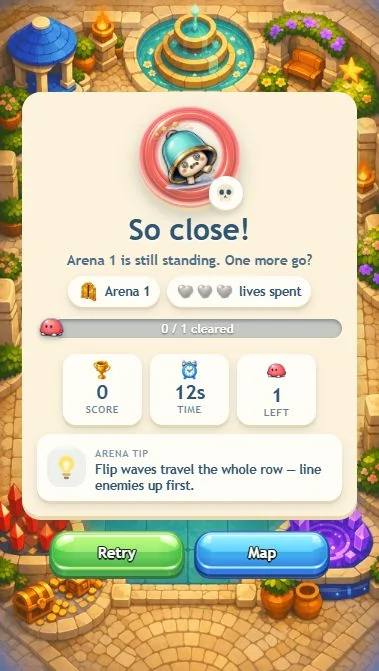
The final checked attempt ended at So close!: lives spent, 0/1 cleared, score 0, time 14 seconds and 1 enemy left. The result's own tip is to line enemies up before flipping. This example records the failed approach, not a completed arena.
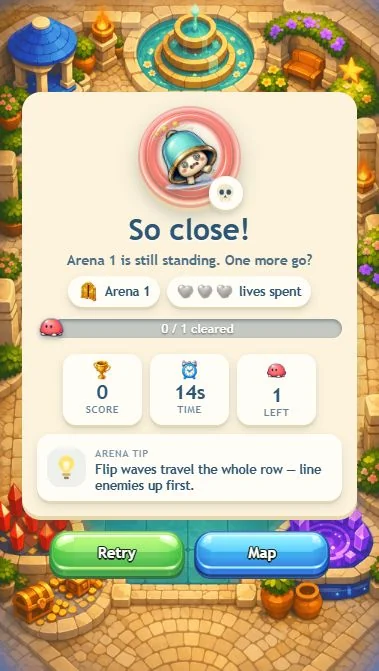
Movement, facing and the flip animation are separate from the victory condition. Repeated contact consumed the hearts before a knockout was confirmed. For the next attempt, establish the enemy's line and an escape route before spending the flip; use the clear counter to test whether that change helped.
No. The saved result explicitly says 0/1 cleared and one enemy left. A winning route still needs a separate verified attempt.
The observed desktop action is a directional flip from the hero. Position and facing matter; the pointer is not an unrestricted board-editing tool.
The home screen offers Campaign, Daily challenge, Tasks, Shop and Survive. Those menu entries are not all-mode completion proof. This guide establishes the opening controls, action feedback and an ended unsuccessful attempt; it makes no claim of an enemy knockout.
Report a changed rule or control. Browser and Android editions can differ; the checked date describes this walkthrough, not a new game release.