Start here
The first-run tutorial opens with Fill the gap to clear lines. Compare the vertical yellow pair in the tray with the aligned gaps in two rows.
Read the controls, follow the real example and compare the result before trying your own run.
Play Gridora →A ManyPlay browser walkthrough · Checked . Screenshots below show the actual game. The catalog image is also a real browser capture. Who publishes these games?
Verified first tutorial clear — not a complete run
The first-run tutorial opens with Fill the gap to clear lines. Compare the vertical yellow pair in the tray with the aligned gaps in two rows.
In the shown opening arrangement, the two yellow rows share an empty cell in the fourth column from the left. The tray contains exactly the vertical pair needed for that gap.
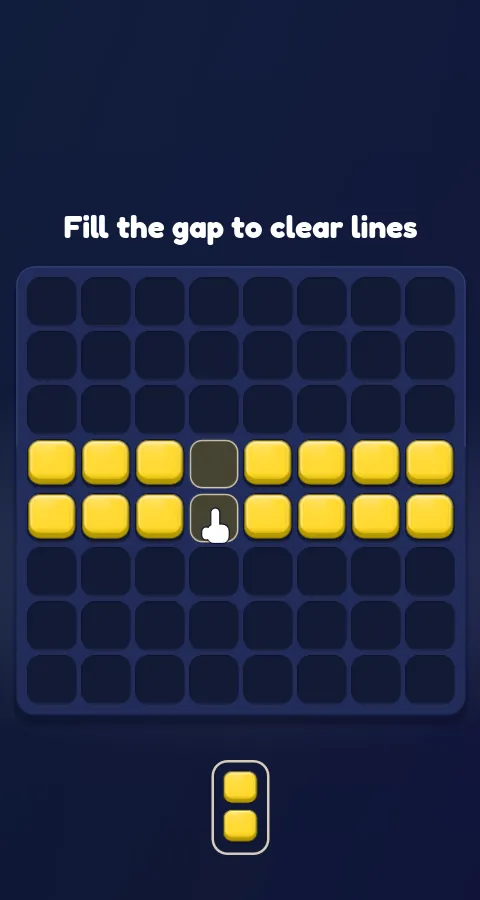
Compare the pair with the aligned empty cells. It can fill both missing cells in one placement.
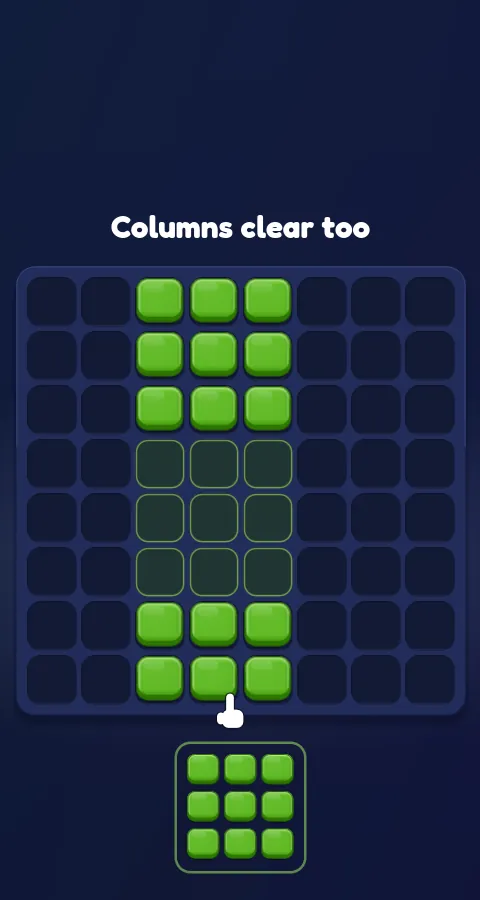
Drag the pair so its lifted preview covers the gaps, then release. After the rows clear, the next tutorial says Columns clear too.
The shape covers both missing cells at once. Completing the rows clears occupied space; simply dropping the pair somewhere else would not demonstrate the same result.
Gridora places tray shapes on an 8×8 board. Reverse Blocks has a different timed-arrival and storage system. Their guides and controls are separate.
It completed the two yellow tutorial rows. The game then advanced to Columns clear too. That is one verified tutorial step, not a full run.
The following tutorial demonstrates column clearing. The supplied browser build also defines further tutorial and game modes; this example verifies only the first row clear and the observed next screen. It makes no claim about a completed run or online progression.
Report a changed rule or control The date describes this walkthrough, not a new game release.