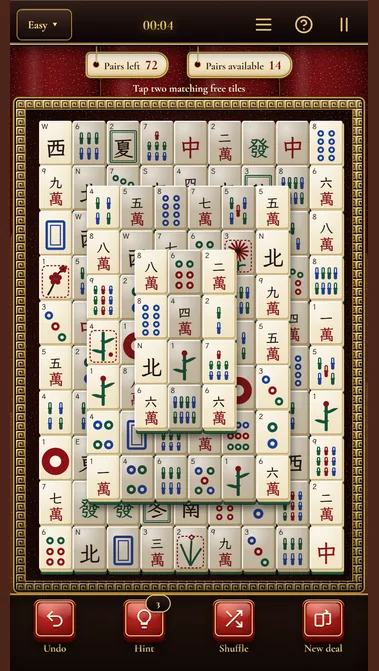
Large tiles make mahjong easy to read. The large-print page opens the game with large tiles: only layouts where every tile is big on a phone screen, with a bigger symbol and a larger index in the corner of each tile. Everything else is the same game - free tiles, pairs, hints, shuffle and undo, at your own pace and without a time limit. You can switch large tiles on or off in the settings at any time; the change starts from the next deal.
How to play
The goal is to clear the table. A deal lays out 144 tiles in a layout of several layers: three suits (Dots, Bamboo and Characters, from 1 to 9), the four winds, the three dragons, four flowers and four seasons. Remove the tiles in pairs of the same tile. You can only take a free tile: nothing lies on it, and its left or right side is open. Covered tiles are dimmed, so you see at once which ones you can play. Tap a free tile, then tap the same one, and the pair leaves the table. Any flower matches any other flower, and any season matches any other season.
Questions about Free Mahjong Games for Seniors: Large Tiles
Is there a time limit?
No. You play at your own pace; the clock above the table only shows how long the deal has taken.
Can I switch large tiles off?
Yes. Large tiles can be switched on or off in the settings at any time; the change starts from the next deal.
Mahjong solitaire is a one-player puzzle played with the 144 tiles of mahjong — not the four-player game. Remove matching pairs of free tiles until the table is empty. On a phone the whole layout fits the screen and the tiles stay large, so every pair is easy to see and tap. Every deal is built solvable. Choose an easy, medium or hard deal, the layout of the day, the Lantern Trail of eighteen layouts or a duel with a friend on one screen. Mahjong runs in your browser on a phone, tablet or computer — no download needed.
Mahjong solitaire is about which pair to take, not only about finding one: every pair you remove can free the tiles under it or beside it.
New to mahjong? Start on Easy. Your first deal shows a short lesson on the real table. After it, Pairs left shows how many pairs are still on the table and Pairs available how many you can remove right now. An unfinished deal is saved in this browser.
Before your next move
Tapping a dimmed tile does nothing: it is covered, or both its sides are blocked. The line above the table tells you why it cannot go yet.
Taking any pair you see can lock tiles under each other. Look at what a pair uncovers before you take it, and keep Undo for a choice that goes wrong.
Browser edition
Play in your browser. No app download is needed.
Questions about Mahjong
Which tiles can I remove?
Only free tiles. A tile is free when no tile lies on top of it, even partly, and when its left side or its right side is open. Covered tiles are dimmed. If you tap one anyway, the line above the table tells you why it cannot be removed yet.
Is every game winnable?
Yes. Every deal is built solvable: the game lays the tiles so that a way to clear the table exists. Your own moves can still lead into a dead end; then you can shuffle the remaining tiles or undo a move and try another pair.
What happens when there are no moves left?
The game tells you that no pairs are left and offers two ways on: Shuffle lays the remaining tiles out again so that pairs open up, and Undo takes your last move back. If no shuffle can help, you can undo moves or start a new deal.
Original ManyPlay game. Controls and examples were checked against the browser edition; cover illustrations are labelled separately from gameplay captures. Report a changed rule or control.