Start here
In the checked Easy puzzle, row 4 contained 8,3,7,4 and 5. Its eighth cell was empty. The Hint explanation named 9 as the only digit that fitted. Another puzzle may start with different clues.
Read the controls, follow the real example and compare the result before trying your own run.
Play Sudoku →A ManyPlay browser walkthrough · Checked . Screenshots below show the actual game. Illustrated catalog covers are presentation artwork. Who publishes these games?
Verified hint, placement, Undo, notes and local reload — not a complete win
In the checked Easy puzzle, row 4 contained 8,3,7,4 and 5. Its eighth cell was empty. The Hint explanation named 9 as the only digit that fitted. Another puzzle may start with different clues.
The row allows 1,2,6 or 9. Column 8 already has 2,3,6 and 7, leaving 1 or 9 after combining it with that row. The middle-right 3×3 box contains 1,4,5,6 and 7, so 1 is excluded and 9 remains. The screenshot highlights exactly this cell.
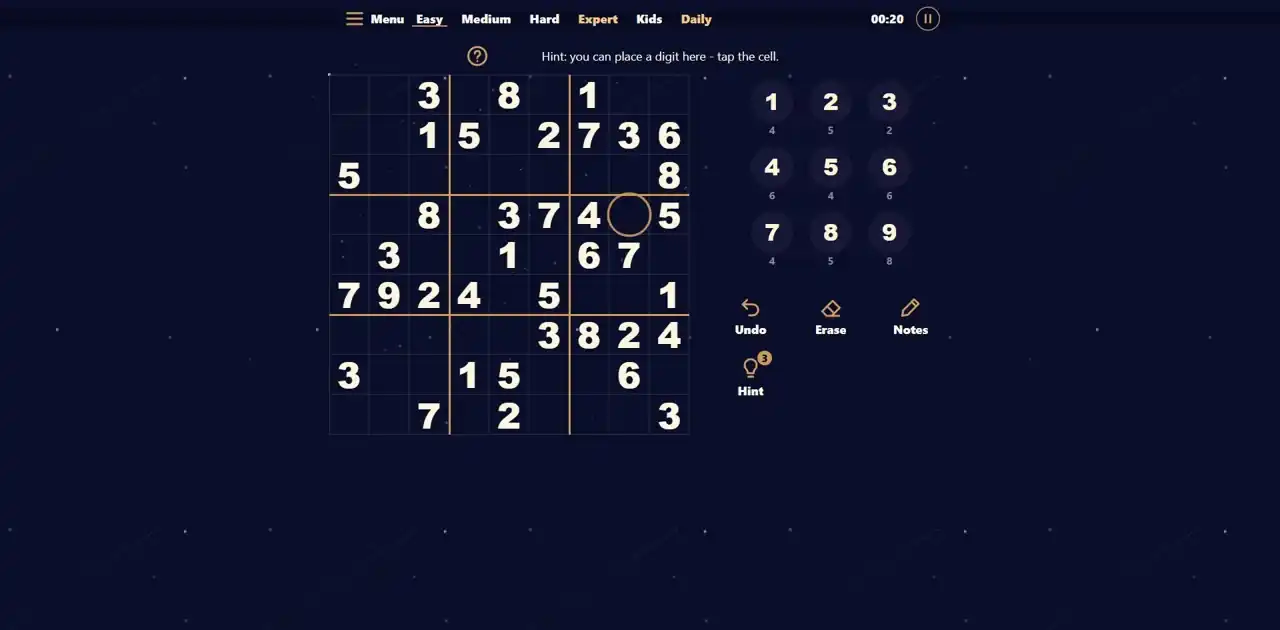
Press Hint. The game displays Only one digit fits this cell:9. The counter falls from 3 to 2 before Place is pressed. The helper explains a constraint; it is not a video or a guaranteed automatic solution.
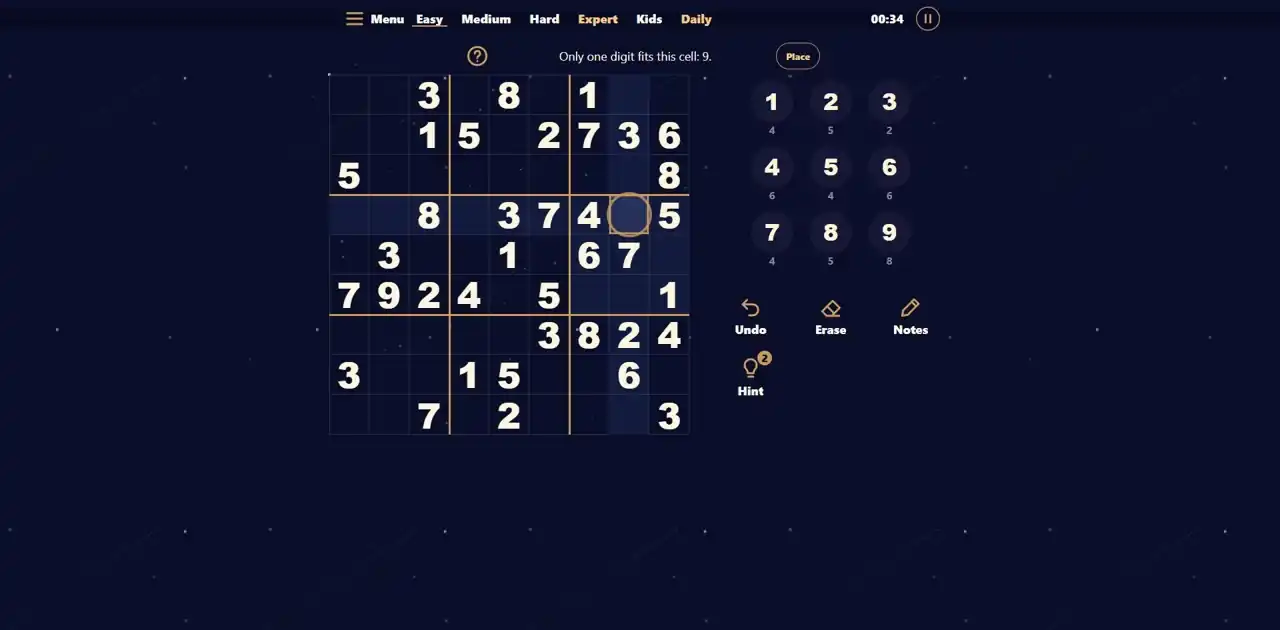
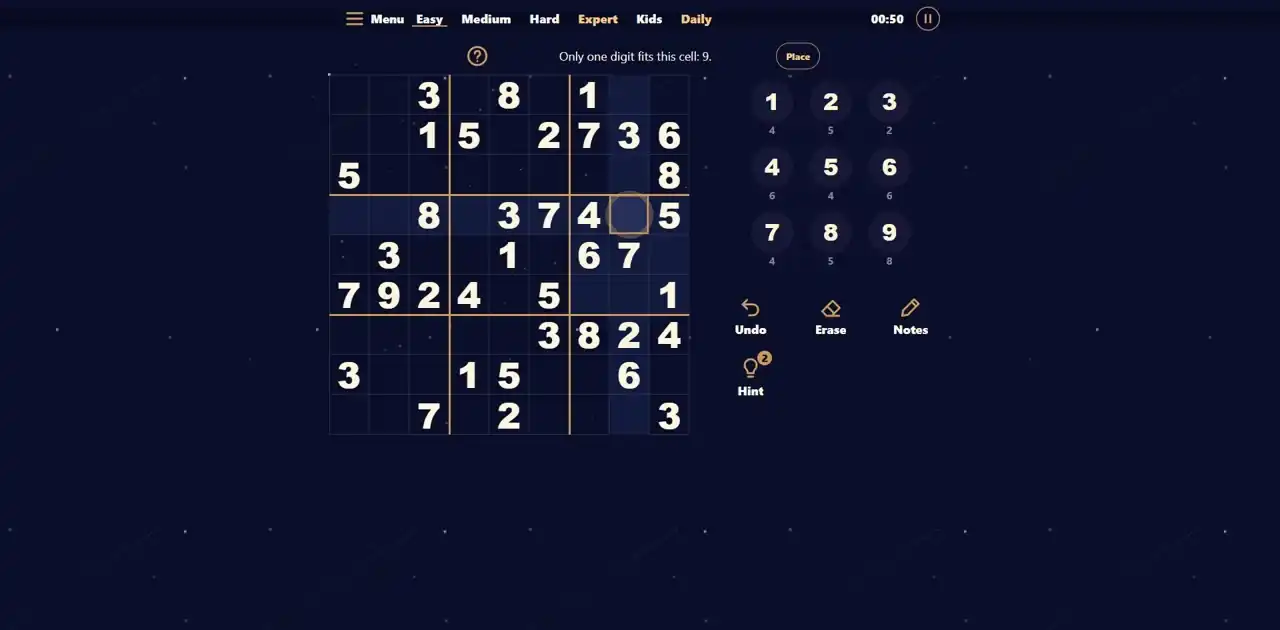
Press Place. Row 4,column 8 now holds 9 and the 9 key falls from 8 left to 7 left. This is one correct placement, not a completed puzzle.
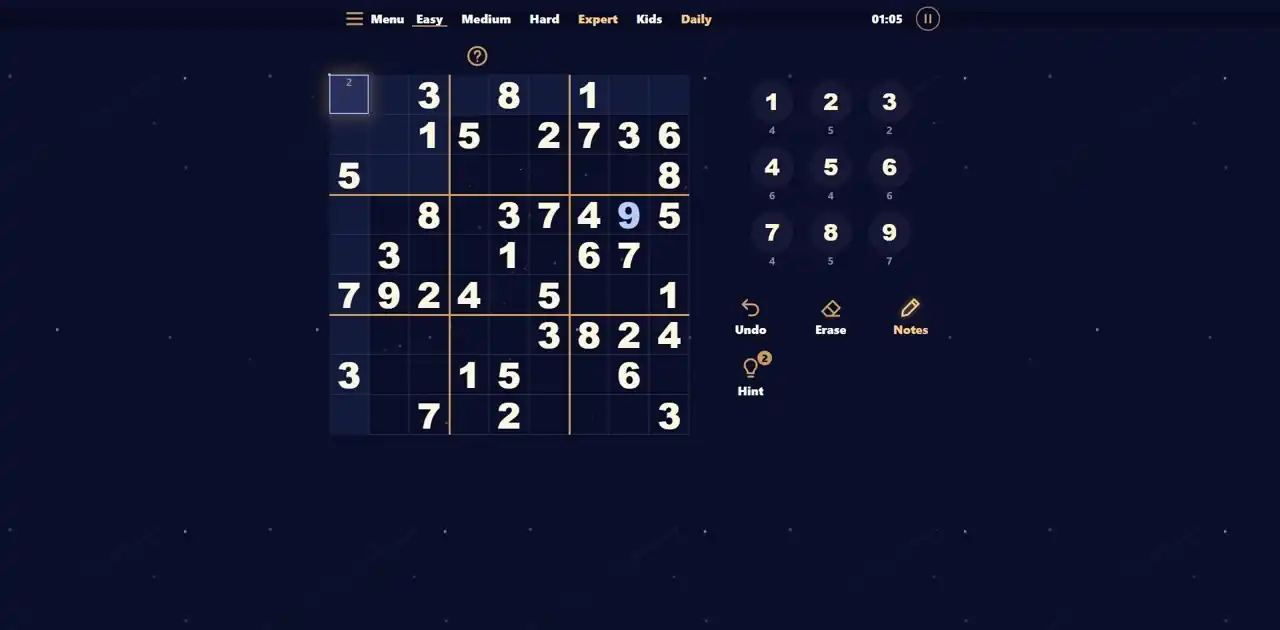
Undo restored the blank cell and 8 left; the hint count stayed 2. We then selected row 4,column 8 and entered 9 manually. In row 1,column 1 we enabled Notes and wrote candidate 2. A normal reload retained the 9,the small 2,elapsed time and two hints.
A legal-looking digit is not automatically forced. The conclusion 9 comes from intersecting the row, column and box, not from guessing or copying a complete solution. Notes help preserve alternatives while the counters show completed placements.
Fill the 9×9 grid with 1–9, with each digit appearing once in every row, column and 3×3 box. Starting clues are fixed. The 6×6 practice mode instead uses 1–6 and 2×3 boxes.
In the checked example, Hint explained that only 9 fitted the highlighted cell. The counter changed from 3 to 2 when the explanation opened. Place then entered 9. Undo restored the empty cell, but did not refund the hint.
No. Notes write small candidate digits inside a cell. They express possibilities, not a completed placement. Turn Notes off to enter a full-size digit; Undo can reverse either action.
A normal page reload restored our placed 9, a candidate 2, elapsed time and two remaining hints in the same browser. This is local storage, not a promise of cross-device or permanent account saves.
The browser menu has Easy, Medium, Hard, Expert, Kids 6×6 and Daily. Daily displayed 29 October 2026 in the check. A midnight rollover and a complete manual win were not verified.
Hard and the 36-cell 6×6 mode were opened in the browser. Daily displayed 2026-10-29. Big digits was enabled and inspected at 390×844 without horizontal overflow. This is desktop responsive QA, not physical-phone or midnight-rollover acceptance. Ads and rewarded hints are unavailable in this delivery.
Report a changed rule or control. Browser and Android editions can differ; the checked date describes this walkthrough, not a new game release.
The following controls and techniques are tied to this browser edition. The screenshots above record one actual opening sequence. They are not a complete solution, a measured solve time or a claim that every person can finish every board.
How to place digits. Tap an empty cell, then tap a digit in the row of keys under the grid. Tapping the same digit again in the same cell removes it. There is a faster way on a phone: hold a digit key for a moment until it glows. The digit stays selected, and every tap on an empty cell places it. Tap the glowing key again to let it go. On a computer you can also type: digits 1 to 9 place a digit, the arrow keys move between cells, Backspace erases, Ctrl+Z undoes, N switches notes, H asks for a hint and P pauses the game.
How many are left. Under every digit key there is a small number: how many of that digit you still have to place. Nine fives in a solved grid, minus the fives already given, minus the fives you placed correctly. When the count reaches zero, the key goes dark, because that digit is complete.
Notes. On harder puzzles you will want to write candidates: the digits that could still go in a cell. Switch on Notes and tap digits to add or remove small notes in the selected cell. When you place a digit, the game removes the same note from every cell in its row, column and block, so your notes stay honest. The eraser removes a digit you placed, or, in a cell without a digit, all of its notes.
Conflicts and mistakes. If a digit appears twice in one area, both cells turn red: that is a conflict, and it breaks the rule right away. A mistake is different: a digit that breaks no rule yet but does not match the solution. By default the game underlines mistakes as soon as you make them. If you prefer to find them yourself, turn off Show mistakes at once in the settings; then a Check button appears and marks the mistakes only when you press it. Either way a mistake never ends the game. There is no limit on mistakes and no second chance to buy: you simply fix the cell and go on.
Levels. Easy puzzles give 36 to 42 digits and need only single candidates. Medium puzzles give 30 to 35 and need locked candidates. Hard puzzles give 26 to 31 and need pairs or triples. Expert puzzles give 22 to 27 and need X-wings, XY-wings or the swordfish. Kids play on a 6×6 grid with digits 1 to 6.
The checked game started with three free hints. Opening a logical explanation changed the allowance to two. Place entered the highlighted digit, and Undo later restored the empty cell without restoring that allowance. In this site delivery, video rewards and independent advertising providers are unavailable, so do not plan a solving strategy around watching an ad.
Local reload restored our manually placed 9 and candidate 2 on the same device. Clearing site data, changing browser or starting another puzzle may replace that unfinished board. The background SDK is connected to a test environment; no cloud-sync or permanent test-account data guarantee is made.
Explanation checked 2026-10-29. Source4bcd5da/61tests/ordinaryChromeinput, hint, Undo, Notes, reload, Hard,6×6,Dailyand390width. No full manual win, physical-phone or midnight-rollover claim.